 rourien
b1920e7c82
rourien
b1920e7c82
The changes adds the comic viewer, book viewer and the book table of contents pop up to the dark theme. It includes dark background for all, light buttons, and light links to each chapter in the table of contents. The only thing I couldn't figure out is how to get the "X" close buttons to turn blue for the comic book viewer and the book table of contents pop up.
Jellyfin Web
Part of the Jellyfin Project








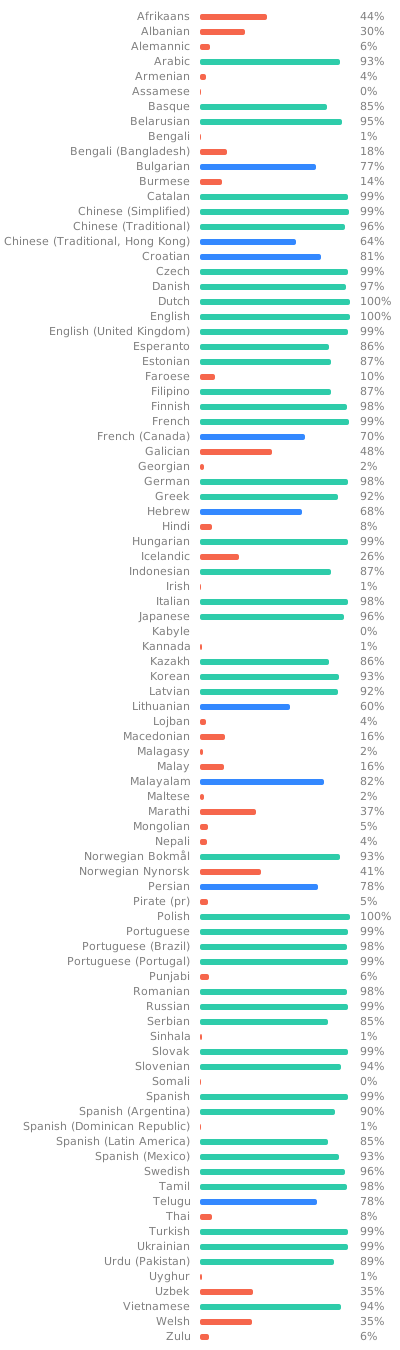
Jellyfin Web is the frontend used for most of the clients available for end users, such as desktop browsers, Android, and iOS. We welcome all contributions and pull requests! If you have a larger feature in mind please open an issue so we can discuss the implementation before you start. Translations can be improved very easily from our Weblate instance. Look through the following graphic to see if your native language could use some work!
Build Process
Dependencies
- Node.js
- npm (included in Node.js)
Getting Started
-
Clone or download this repository.
git clone https://github.com/jellyfin/jellyfin-web.git cd jellyfin-web -
Install build dependencies in the project directory.
npm install -
Run the web client with webpack for local development.
npm start -
Build the client with sourcemaps available.
npm run build:development