 Xavier-Do
a928b12c44
Xavier-Do
a928b12c44
When refreshing a /video page, since no player is available,
`getCurrentPlayer` will be empty and `bindToPlayer` will crash leading
to a redirect with `appRouter.goHome();`
This is also the case when navigating with previous then next in the
browser.

Before that that, the background is set in `viewbeforeshow` using
`setBackdropTransparency(TRANSPARENCY_LEVEL.Full);`

This will leave unexpected classes in the dom leading to a white
background on the main page.

This fixes proposes to reset the transparency before going to home
using `setBackdropTransparency(TRANSPARENCY_LEVEL.None);`
Anyway, this looks a little fragile and a deeper fix may be preferable
in the future.

Another solution would be to move the
`setBackdropTransparency(TRANSPARENCY_LEVEL.Full);` when the player is
ready but my understanding of the flow is not enough to now if it would
have any unexpected results.
Jellyfin Web
Part of the Jellyfin Project








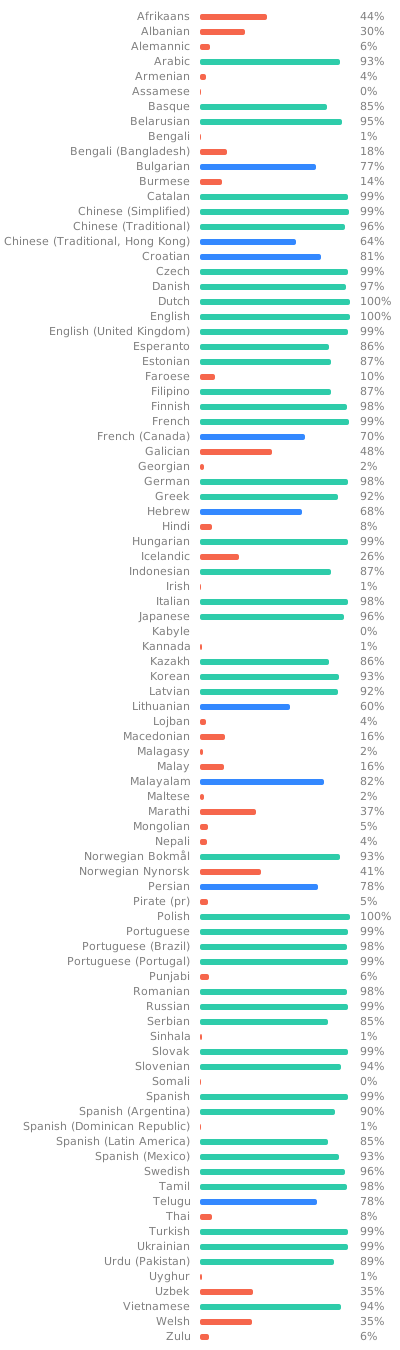
Jellyfin Web is the frontend used for most of the clients available for end users, such as desktop browsers, Android, and iOS. We welcome all contributions and pull requests! If you have a larger feature in mind please open an issue so we can discuss the implementation before you start. Translations can be improved very easily from our Weblate instance. Look through the following graphic to see if your native language could use some work!
Build Process
Dependencies
- Node.js
- npm (included in Node.js)
Getting Started
-
Clone or download this repository.
git clone https://github.com/jellyfin/jellyfin-web.git cd jellyfin-web -
Install build dependencies in the project directory.
npm install -
Run the web client with webpack for local development.
npm start -
Build the client with sourcemaps available.
npm run build:development
Directory Structure
.
└── src
    ├── apps
    │   ├── experimental  # New experimental app layout
    │   └── stable        # Classic (stable) app layout
    ├── assets            # Static assets
    ├── components        # Higher order visual components and React components
    ├── controllers       # Legacy page views and controllers 🧹
    ├── elements          # Basic webcomponents and React wrappers 🧹
    ├── hooks             # Custom React hooks
    ├── legacy            # Polyfills for legacy browsers
    ├── libraries         # Third party libraries 🧹
    ├── plugins           # Client plugins
    ├── routes            # React routes/pages
    ├── scripts           # Random assortment of visual components and utilities 🐉
    ├── strings           # Translation files
    ├── styles            # Common app Sass stylesheets
    ├── themes            # CSS themes
    ├── types             # Common TypeScript interfaces/types
    └── utils             # Utility functions
- 🧹 — Needs cleanup
- 🐉 — Serious mess (Here be dragons)