 Nathaniel J. Smith
a1a539eeb4
Nathaniel J. Smith
a1a539eeb4
The hls.js maxBufferLength parameter sets the minimum amount of video
that hls.js will try to buffer. We used to have this set to 30
seconds, but this caused problems with high-bitrate videos trying to
buffer too much data and making Chrome/Firefox cranky, so
maxBufferLength was reduced in #2148 and #2224.

However, those PRs *also* reduced maxMaxBufferLength to 6 seconds,
which doesn't make sense -- basically this is telling hls.js that it
must *never* buffer more than 6 seconds at a time, even if there's
plenty of memory and it wouldn't make the browser cranky at all. And
obviously such a tiny buffer makes it very easy for small network
glitches to cause user-visible playback problems.

So this PR removes the maxMaxBufferLength configuration entirely,
accepting hls.js's default (which is currently 600 seconds).

Fixes #2856
Jellyfin Web
Part of the Jellyfin Project








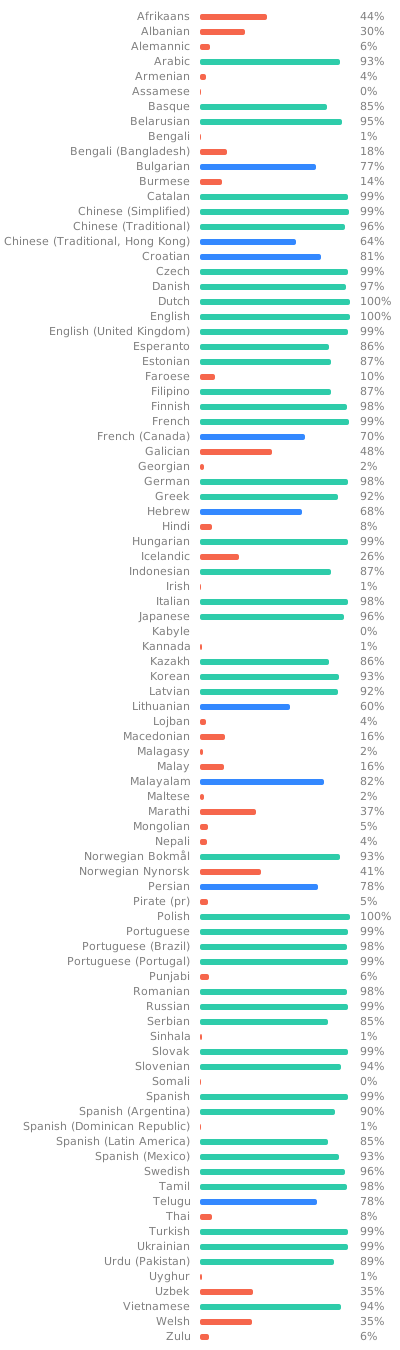
Jellyfin Web is the frontend used for most of the clients available for end users, such as desktop browsers, Android, and iOS. We welcome all contributions and pull requests! If you have a larger feature in mind please open an issue so we can discuss the implementation before you start. Translations can be improved very easily from our Weblate instance. Look through the following graphic to see if your native language could use some work!
Build Process
Dependencies
- Node.js
- npm (included in Node.js)
Getting Started
-
Clone or download this repository.
git clone https://github.com/jellyfin/jellyfin-web.git cd jellyfin-web -
Install build dependencies in the project directory.
npm install -
Run the web client with webpack for local development.
npm start -
Build the client with sourcemaps available.
npm run build:development